The Kaiden Project™ is designed to speak directly to the leadership team involved in evaluation, recommendation, implementation, and executive decision-making:
See Whether the Agreed Support Reached the Student.
A student may receive help in one class while still struggling to begin work in another. Several teachers may see missing assignments without having one coordinated set of priorities.
KaidenOS is being developed to help authorized staff bring that context together, identify the student's Top 3 and record what each adult agreed to provide.
Instructional leaders can use the pilot to examine whether the workflow helps staff distinguish an instructional need from repeated redirection, coordinate the first accessible step and review whether support occurred.
The pilot also needs to reveal workload. How long does it take to document a concern? Who accepts the handoff? Does the teacher continue receiving coordination tasks after another role has accepted responsibility?
Start with an agreed school or cohort. Select the commercial plan that fits the scope, then review the full pilot process below.
See Where Student Support Is Moving—and Where It Is Waiting.
District leaders need to know whether participating schools can carry a concern from the first review through accepted ownership, delivered support and follow-up.
A district total should not hide a school with unaccepted cases, unavailable support or repeated delays. Grade-band views should also remain distinct so the needs of elementary, middle and high-school students are not blended into one number.
The proposed Kaiden pilot examines participation, staff adoption, response capacity, support delivery and family communication. It also records what prevents the work: staffing, scheduling, unclear responsibility or a service that is unavailable.
Expansion should follow a review of that evidence. Begin with a defined scope, confirm the staff and technical requirements, and decide what would justify continuation.
Six things that change when Kaiden is operating in a school or district.
Student voice becomes visible earlier
Students have a structured way to communicate how they are arriving, what they are working on, and when they may need support — before that need becomes a behavior, attendance, or academic signal.
Support requests enter a structured adult workflow
Student-initiated Care Check™ requests route to the configured adult, creating follow-through visibility that persists until completion.
Principals gain daily school-level visibility
Each principal can see participation, support demand, counselor response, and staff adoption in one place rather than waiting for end-of-quarter reporting.
District leaders see patterns across participating schools
Growth Health™ and executive reporting give district leadership a structured view across schools without requiring access to individual student records.
Families receive appropriate growth context
Parents and guardians see age-appropriate information about their child's goals, recognitions, and support — without accessing confidential staff notes or other students' records.
The 90-Day Pilot establishes whether the model works
Kaiden does not ask for a multi-year commitment before evidence exists. The pilot produces a Pilot Impact Report for district leadership review. Expansion is the district's decision.
Monday through Wednesday — before Thursday's visible outcome.
A student may experience a meaningful change in confidence, belonging, or academic frustration on Monday. A teacher may notice something on Tuesday. A counselor may learn something on Wednesday. But a referral, a discipline record, an attendance drop, or a grade change may not appear until Thursday — or the following week, or the quarter after that.
The visible outcome is real. It is also, by that point, a lagging indicator.
Kaiden is designed to create an earlier opportunity.
Student voice and structured adult response can begin closer to the experience — before the signal everyone can finally see becomes the first signal that triggers action.
Present. Assignment completed. No referral. No obvious concern. A student who appears to be getting through the day.
Something changed. I am struggling with something I have not said yet. I am not sure anyone knows.
Behavior may not be the first signal. It may simply be the first signal everyone can finally see.
Every role connects to the same student. Each sees only what their role allows.
Kaiden adds a structured growth and support layer that connects existing school roles around the student's own activity and voice.
STUDENT
Age-appropriate check-ins, goals, reflection, and student-initiated support across K–12. The experience evolves developmentally as the student matures.
Explore the K–12 Student Experience →EDUCATOR
Role-appropriate growth signals, support routing, recognition tools, and student context inside the educator workflow. Teachers are not turned into counselors.
See the Teacher and Counselor Experience →COUNSELOR
Structured caseload view, student-initiated support queue, follow-up tracking, and counselor workflow according to configured school permissions.
See the Counselor Workspace → · Intervention & Meeting Tools →PRINCIPAL
School-level participation, Care Check™ demand, counselor response capacity, staff adoption, and Growth Health™ visibility updated daily.
INSTRUCTIONAL LEADERS & DISTRICT LEADERSHIP
Cross-school patterns, Growth Health™ trends, counselor capacity, executive reporting, and authorized student-level drill-down in a governed workspace.
See the District Intelligence Workspace → · Access & Calendar Foundation →FAMILY
Age-appropriate growth information, goal context, recognitions, weekly summaries, and appropriate support visibility per school configuration.
See the Family Experience →What each role does with Kaiden — and which tier it requires.
Tier restrictions apply to capabilities, not job titles. A person's role does not by itself grant access — the tier the district has purchased does. A superintendent can hold authorized, Foundation™-level access to a single school; the district-wide executive overview specifically requires Executive Intelligence™. Not every role receives every feature under Foundation™.
Teachers
Foundation™Review participation, priorities and student signals for their own classroom; document appropriate follow-through. Teachers are not turned into counselors, and do not see other classrooms' caseloads.
Build Me™ (K–5): a teacher sees daily readiness/confidence check-ins for their own class. Find Me™ (6–8): a teacher sees identity/belonging signals tied to their subject period. Launch Me™ (9–12): a teacher sees goal and Top-3 execution signals relevant to their course.
Counselors & Student-Services Staff
Foundation™ (school-level) → Growth Intelligence™ (district-wide coordination)Receive authorized requests, track ownership, document support and review continued needs within their own caseload under Foundation™. Coordinating cases and accepted handoffs across schools in a district requires Growth Intelligence™ or above.
Build Me™ (K–5): supporting a child's early confidence or belonging concern. Find Me™ (6–8): tracking an identity or peer-belonging support case. Launch Me™ (9–12): coordinating a purpose/pathway support conversation.
Principals
Foundation™See school-level participation, overdue follow-up and unresolved work for their own building — included under Foundation™. Comparing that data against other schools in the district requires Growth Intelligence™.
Applies the same across grade bands — a K–5, 6–8, or 9–12 principal each sees their own building's participation and follow-up in the language appropriate to that grade band.
District Teams
Growth Intelligence™Coordinate practices and compare implementation across participating schools — cross-school visibility is a Growth Intelligence™ capability, not included under Foundation™ alone.
A district team can compare Build Me™, Find Me™, and Launch Me™ adoption and support patterns side by side across every participating school.
Superintendents
Executive Intelligence™ for the executive/recurrence viewReview district priorities, support demand, improvement and recurrence through the contracted executive capabilities — this view specifically requires Executive Intelligence™. A superintendent can separately hold authorized, Foundation™-level access to an individual school without the district being on the Executive Intelligence™ tier; the title alone does not grant the district-wide executive overview.
The executive view aggregates Build Me™, Find Me™, and Launch Me™ patterns across every school in the district for board-level reporting.
Not a replacement. An addition.
Kaiden operates alongside SIS, LMS, PBIS, student-success platforms, and existing communication systems — adding a student-generated growth and support layer that existing systems are not primarily designed to capture.
SIS / District Systems
Records, enrollment, schedules, attendance, grades, operations
Kaiden does not replace the student information system
LMS
Courses, assignments, instruction, learning delivery
Kaiden adds student perspective alongside academic delivery
PBIS / MTSS
Interventions, progress monitoring, behavior frameworks
Kaiden complements by surfacing earlier student-generated signals
Communication Tools
Teacher-family messaging, school communications
Kaiden adds role-specific growth context alongside existing channels
College and Career Readiness
Course planning, applications, pathways
Kaiden LAUNCH ME™ connects daily growth to future readiness
Counseling / Student Success
Interventions, support coordination, documentation
Kaiden structures support workflow visibility and follow-through
Kaiden is not asking the district to rip out its existing technology stack.
It is adding a student-generated growth and support layer that the existing stack is not primarily built to provide.
Kaiden supports the rollout. Your district keeps governance and decision authority.
District leadership defines the school, grade band, authorized roles, support pathways, family configuration and implementation scope.
District Leadership
Select pilot school or grade band. Confirm executive sponsor. Approve implementation scope and success criteria.
School Leadership
Confirm principal lead, educator participants, counselor workflow and staff communication plan.
District IT / Privacy
Review access, security, privacy requirements and applicable district technology processes. Kaiden supports configuration and technical documentation.
Kaiden Implementation Team
Configure the environment, support onboarding, prepare launch materials, assist staff setup and support the pilot through the 90-day measurement period.
What happens before Day 1?
A pilot should not begin with students logging in. It begins with the adults agreeing on how the environment will operate.
DEFINE — Pilot Scope
School or grade band selected. Executive sponsor identified. Participating staff confirmed.
REVIEW — Privacy and Technology
District review process completed. Authorized roles defined. Configuration requirements documented.
CONFIGURE — School Environment
Support pathways configured. User roles prepared. School settings established per district requirements.
PREPARE — Staff Readiness
Participating educators oriented. Counselor workflow reviewed. Principal leadership view prepared.
LAUNCH — Day 1
Students enter a configured environment with the participating adults already aware of their roles.
The pilot is designed to minimize district IT burden without removing district oversight or approval.
One school. 90 days. Decide with the evidence in front of you.
Kaiden does not ask a district to commit to multi-year deployment before evidence exists. The 90-Day Pilot is a structured validation model with a defined scope, a measurement framework, and a Day-90 decision point that belongs to district leadership.
Foundation — Establish the Participation Baseline
Students begin check-ins. Teachers orient to the workflow. Counselors establish the support pathway. The goal is reliable daily participation from the student cohort.
Growth Intelligence — Patterns Become Visible
Participation is consistent enough that Growth Health™ begins calculating. Care Check™ activity is visible. Educator and counselor response is measurable.
Decision Point — Evidence-Based Leadership Review
The Pilot Impact Report is prepared from verified records. District leadership reviews all metrics then decides what comes next.
The 90-Day Pilot remains a validation stage and is not represented as a guaranteed commercial conversion. No outcome is assumed.
Before the pilot begins, district leadership and Kaiden agree on how success will be measured.
Districts should define their own thresholds for what constitutes sufficient evidence before expansion decisions are considered.
Family Engagement is a composite signal — not a single open-rate metric. It reflects active engagement with growth and support context, not whether a notification was opened.
Approved pricing.
These are purchasing plans, separate from the tiers of support a school uses within MTSS. Tier restrictions apply to capabilities, not job titles — see the leadership breakdown above for how access works role by role.
| Offer | Price | Minimum |
|---|---|---|
| 90-Day Guided Pilot | $4,500 one time | One school, up to 1,000 students |
| Foundation™ | $6/student/year | $3,000/school/year |
| Growth Intelligence™ | $12/student/year | $6,000/school/year |
| Executive Intelligence™ | $18/student/year | $18,000/district/year |
| Enterprise (21+ schools) | Custom quote | Written scope and price |
The 90-Day Pilot is a validation stage. It does not automatically convert into an annual agreement, and no pilot-to-contract credit applies.
Day 90 is a conversation — not a contract renewal moment.
At Day 90, Kaiden prepares a Pilot Impact Report from verified records. The report is presented to district leadership for review. The district then decides what comes next.
EXPAND
Evidence supports broader deployment across additional grade bands, schools, or district-wide.
REFINE
The model shows promise, but configuration or workflow should change before expansion.
CONTINUE
Additional validation is warranted before making a larger deployment decision.
CONCLUDE
The evidence does not support continued implementation in its current form.
Kaiden should not tell the superintendent: “Our pilot proves you should buy.”
Kaiden should say: “Here is the evidence. You decide.”
Built for the leaders who evaluate what comes next.
The Kaiden Project™ is designed to support the full district evaluation pathway — from instructional leadership review through cabinet alignment, board consideration where required, pilot deployment, and evidence review. No single role carries this alone.
Instructional Leadership Review
Directors of Curriculum & Instruction, Student Services leaders, MTSS coordinators and Assistant Superintendents evaluate the platform fit, pilot model, and implementation requirements.
Cabinet / Superintendent Alignment
Findings are presented to the superintendent and cabinet for alignment on scope, budget parameters, district priorities and implementation sequencing.
Board Consideration (if required)
Larger district commitments may require board presentation. Kaiden supports the preparation of board materials from the 90-Day Pilot Impact Report.
90-Day Pilot Deployment
One school. Defined scope. Agreed success metrics. Structured measurement period with a Day-90 evidence review.
Evidence Review
District leadership reviews the Pilot Impact Report. Participation, adoption, support activity, and growth patterns are documented. The district decides what comes next.
Expansion Decision
The district — not Kaiden — determines whether to expand, refine, continue, or conclude based on the evidence.
Instructional leaders often carry the evaluation, recommendation, and alignment work that makes a superintendent and cabinet decision possible. Kaiden is designed to support that work — not bypass it.
Kaiden does not imply that instructional leaders independently have final purchasing authority. The decision pathway above reflects how district decisions actually move.
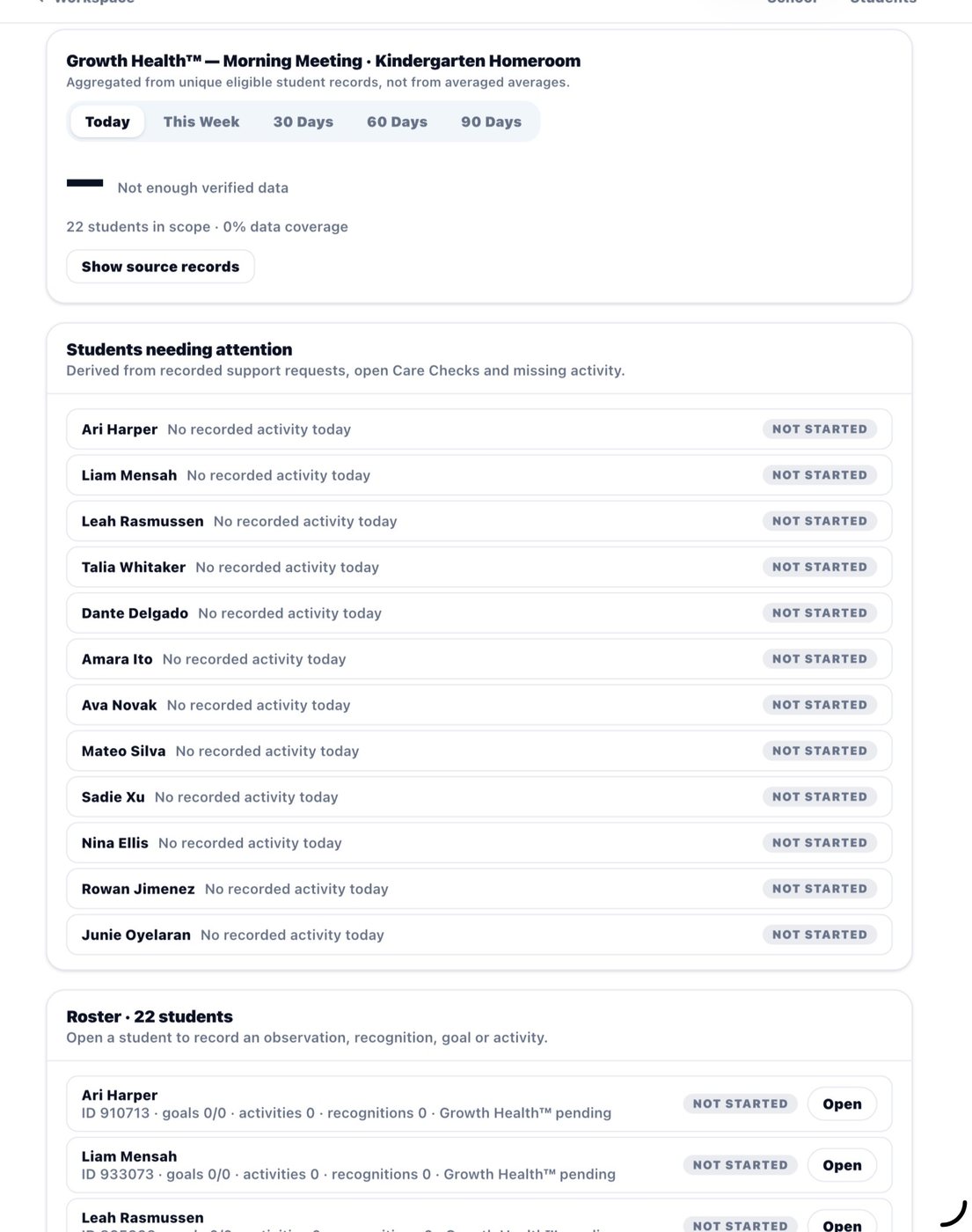
The operating model above is supported by a working district intelligence environment.
By this point, the district understands what Kaiden solves, how it fits, who owns implementation, what success is measured against, and what happens after the pilot. The following interfaces show how that operating model appears across the system.
District-wide visibility — updated daily.
All interfaces below show demonstration data, not a live district deployment.
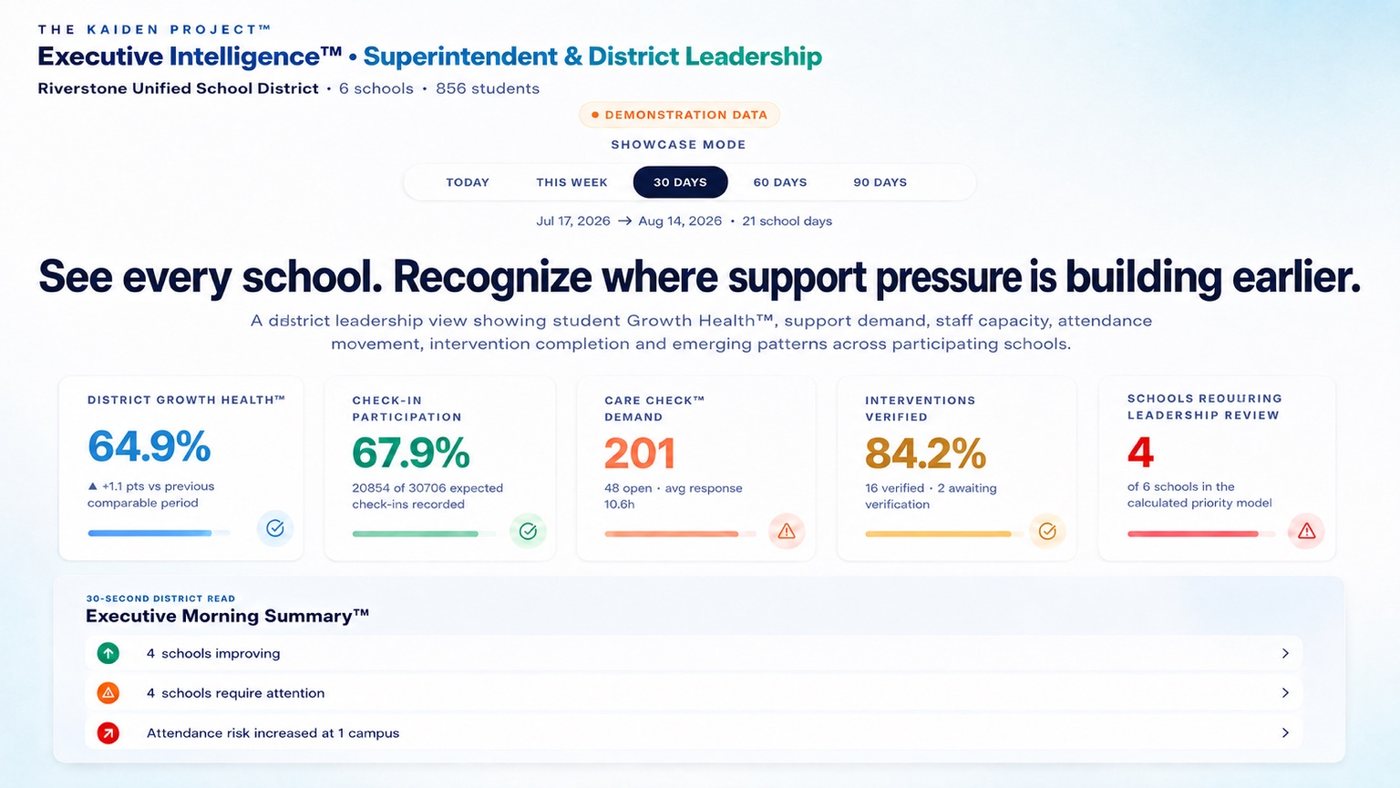
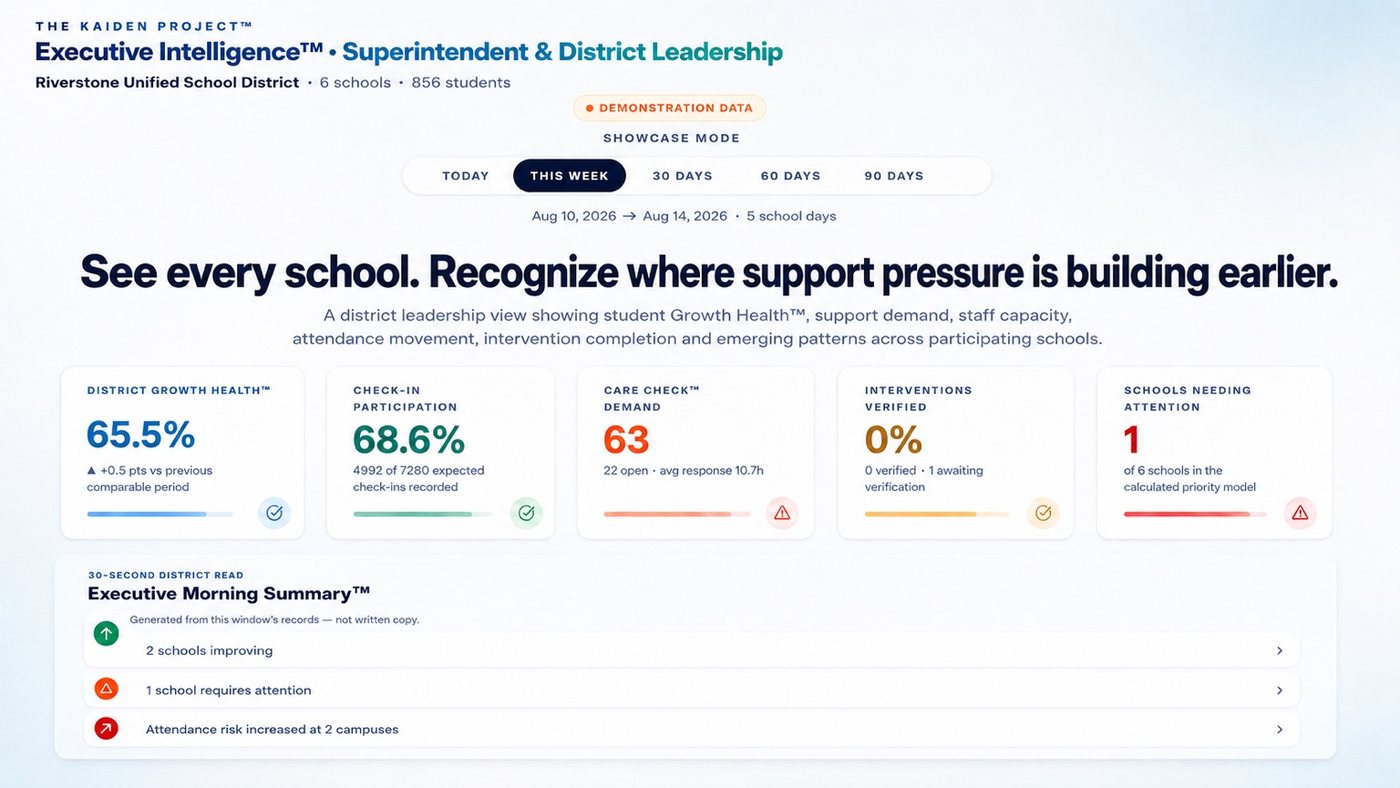
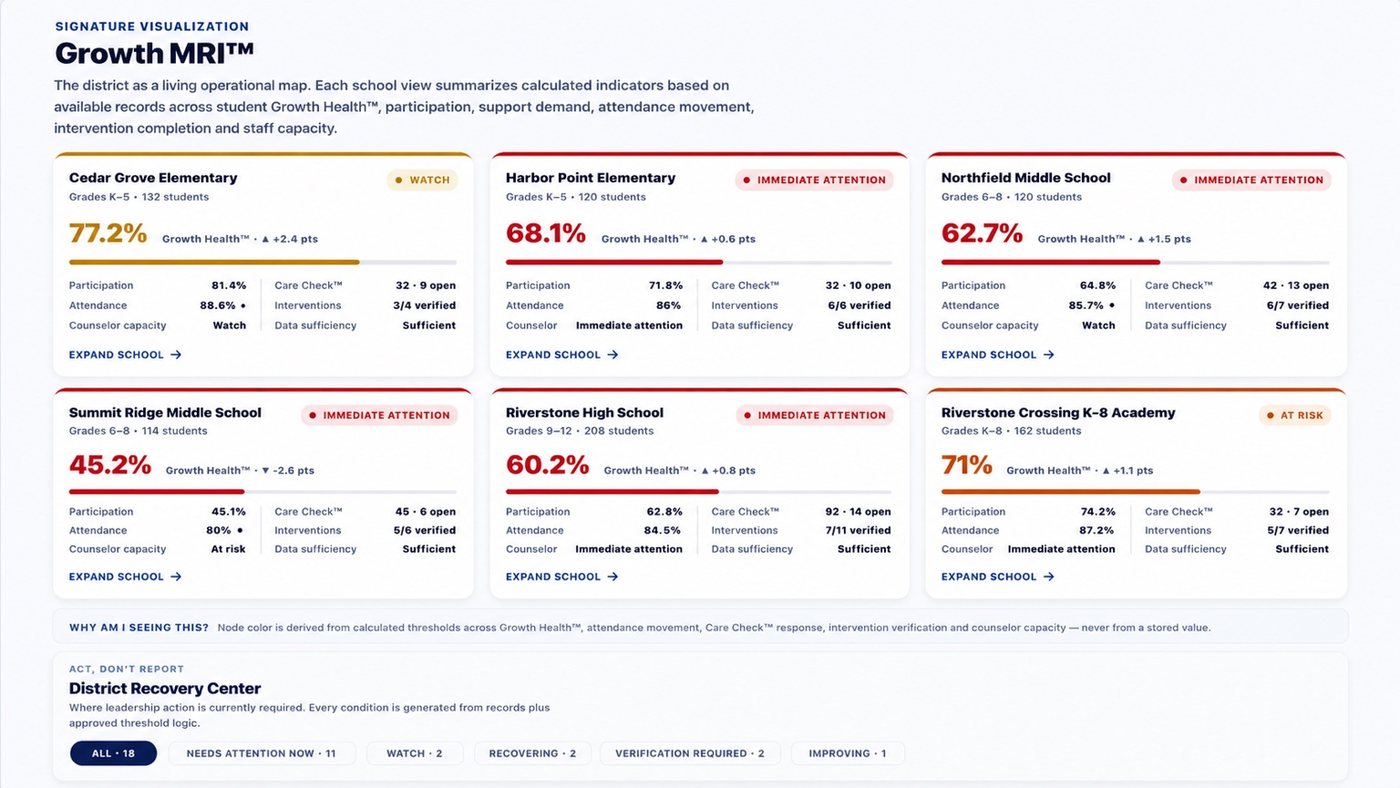
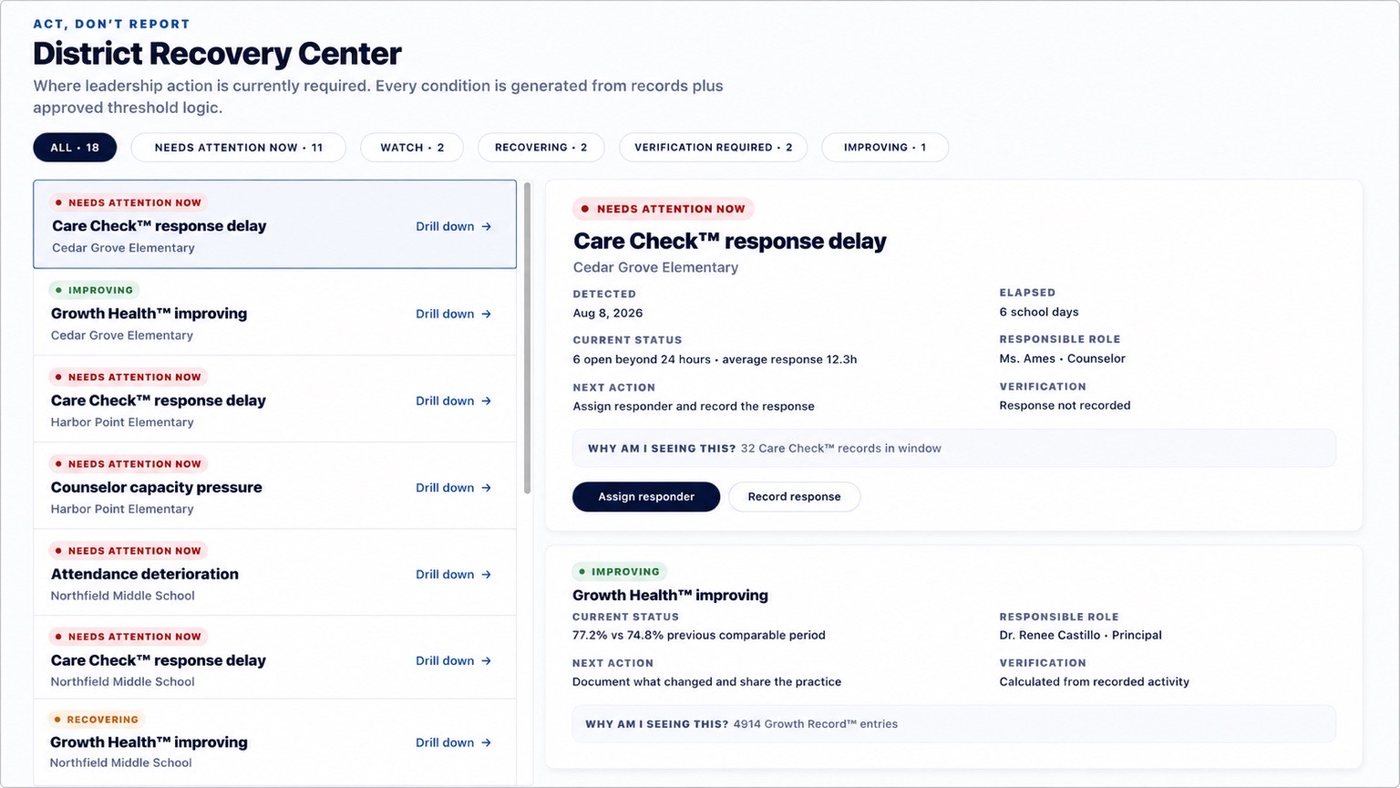
Executive Intelligence™ does not stop at a detached dashboard.
Authorized leaders can move from district view into the appropriate school, classroom, and student context — without losing role boundaries, data accountability, or the human story behind the numbers.
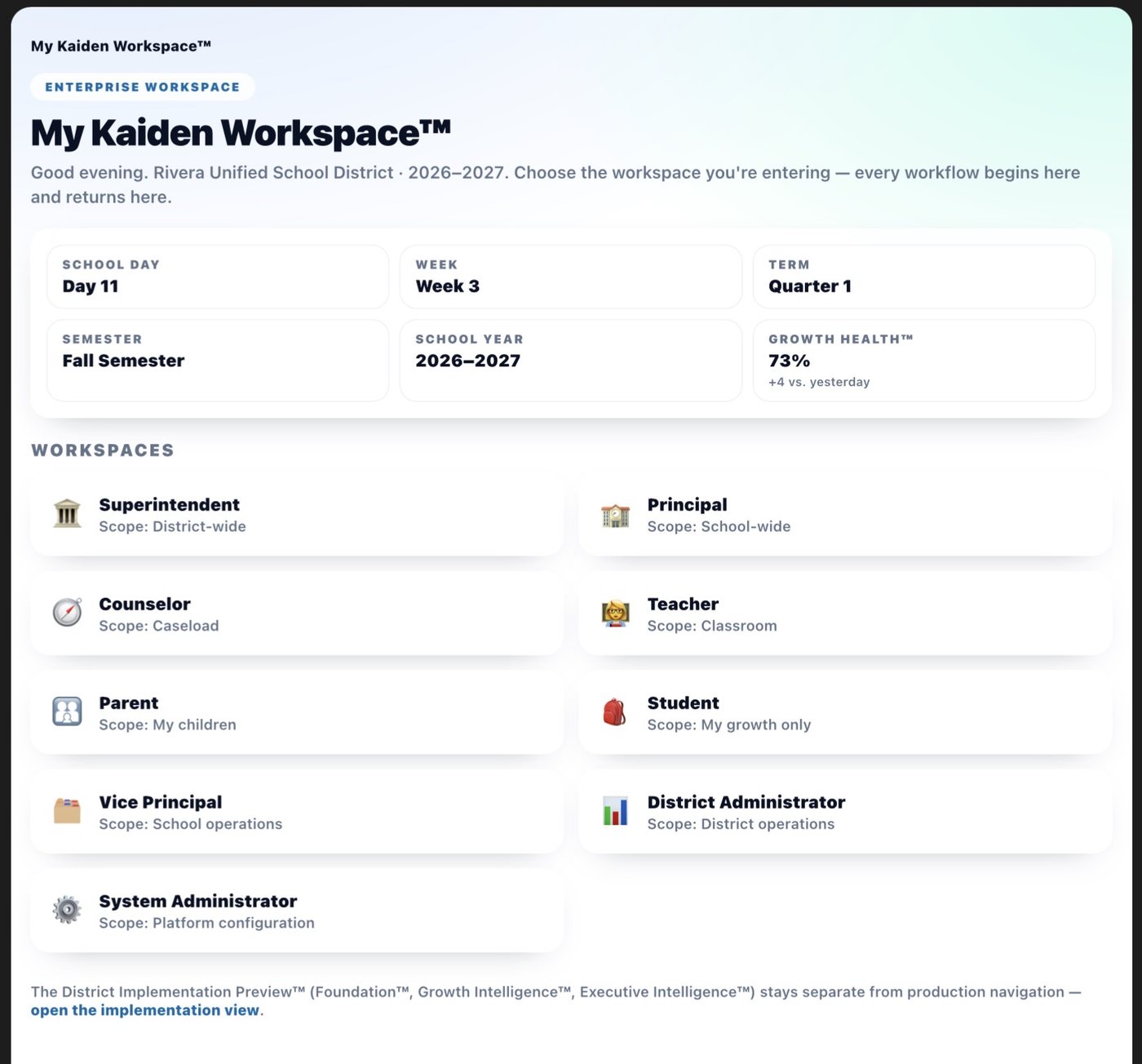
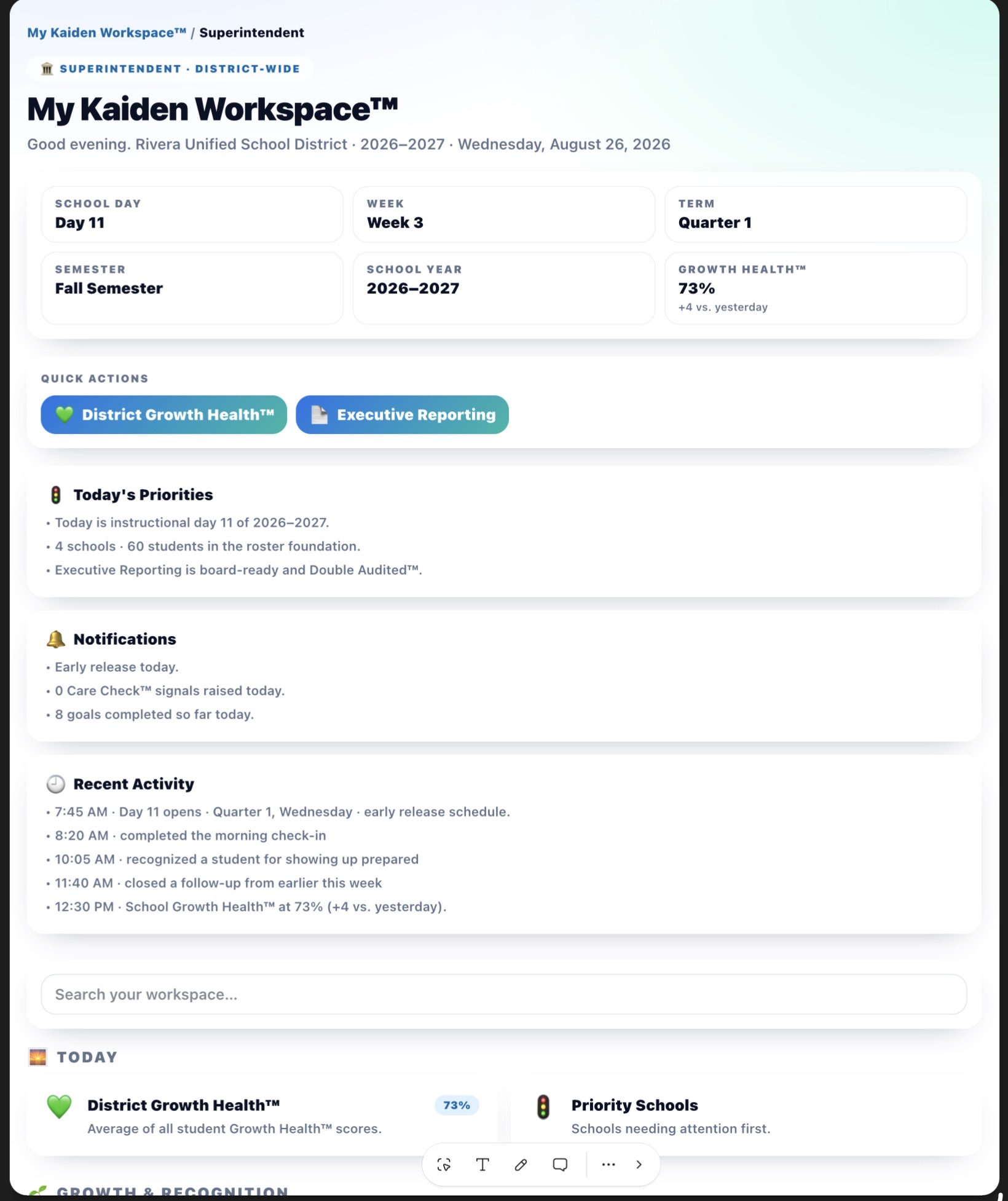
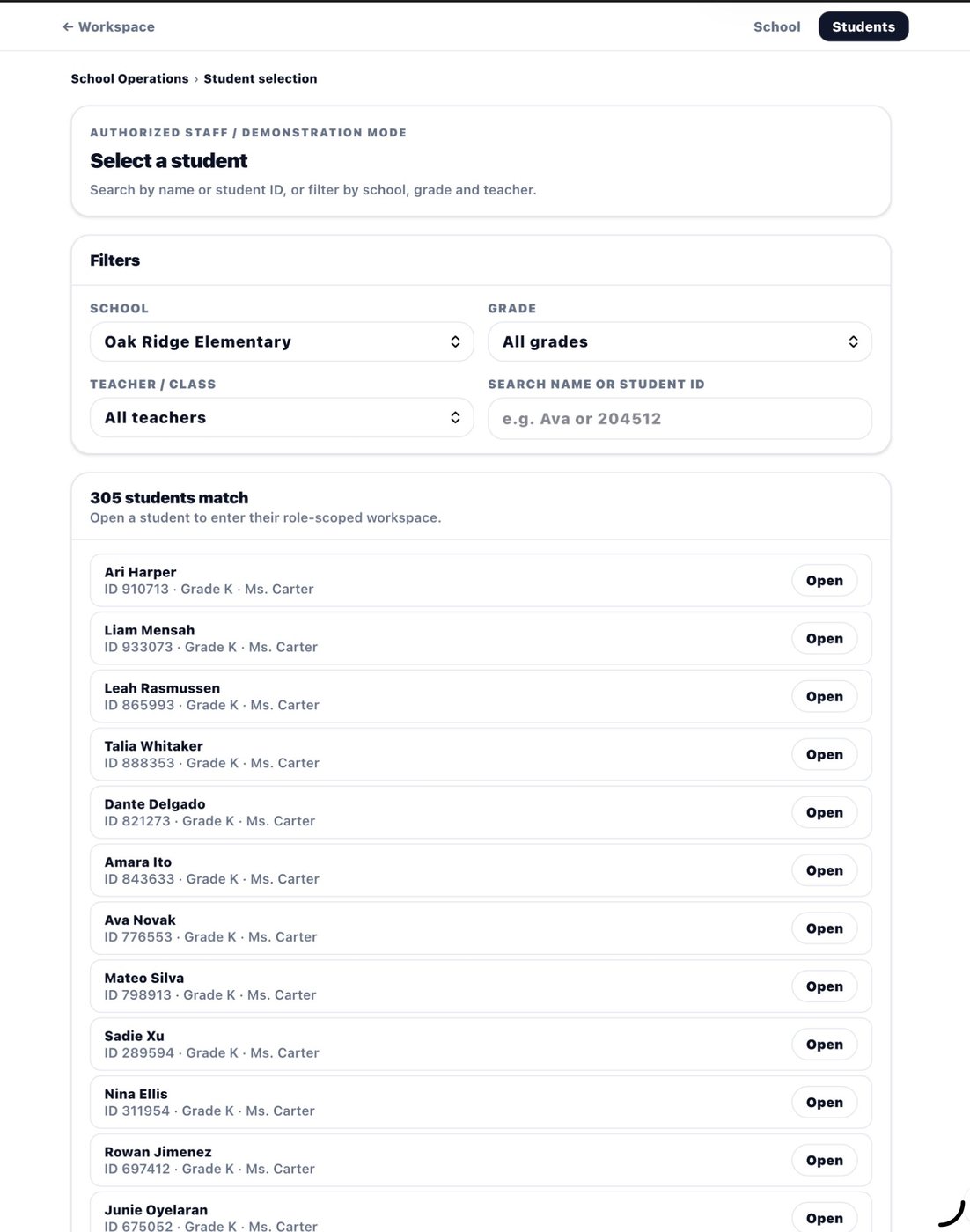
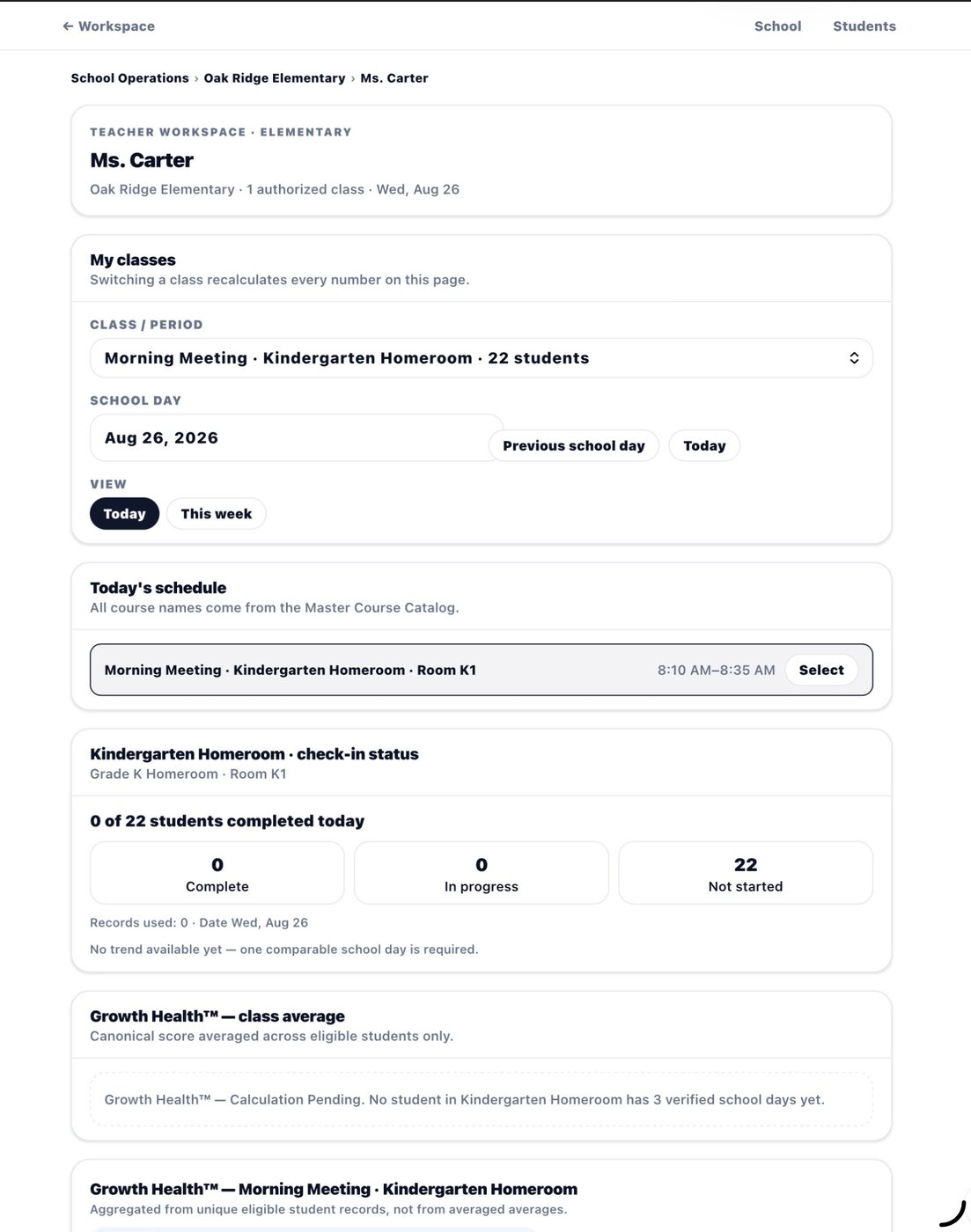
Student voice enters a structured adult workflow — not a void.
When a student initiates a Care Check™ request, it does not simply generate an alert. It enters a configured pathway that assigns the request to an appropriate adult and tracks follow-through until completion.
Student initiates Care Check™
Student selects from structured options. The request routes to an appropriate adult as configured by the school — teacher, counselor, or designated trusted adult. Follow-up status can remain visible to the student.
Assigned adult receives the request
The adult responsible for the configured pathway sees the request in their role-specific workflow. The system does not auto-notify parents or escalate automatically. Mandated-reporter obligations always apply to authorized adults.
Follow-through is tracked until completion
The request remains visible in the counselor or educator workflow until it reaches a documented resolution. Follow-up completion is a measurable component of the Pilot Success Scorecard™.
Evidence is preserved according to configuration
The interaction contributes an appropriate record to the continuing Growth Record™. Private counselor notes and confidential student information remain protected according to school configuration and applicable requirements.
Care Check™ is designed to surface student support needs earlier — not to diagnose students, predict clinical outcomes, or replace counselor judgment. Patterns inform. Authorized adults decide.