PlatformDistrict LeadersEducatorsFamiliesWhy Kaiden90-Day PilotKP MovementTrust & PrivacyVideo LibraryInvestor Partners Schedule Discovery
For Teachers & Counselors

See which students need you before they stop asking.

Kaiden does not add a second system. It surfaces structured student signals inside the workflow you already use, gives you the tools to respond, and preserves follow-through until completion.

Schedule a Discovery Session →
1 — What does the student tell me?

The student voice comes first. Adults respond. Not the other way around.

Before any educator sees a classroom signal, the student has already had the opportunity to communicate. A daily check-in, a Care Check™ request, or a goal update from the student creates the record that the educator responds to — not a system-generated alert or an educator-assigned label.
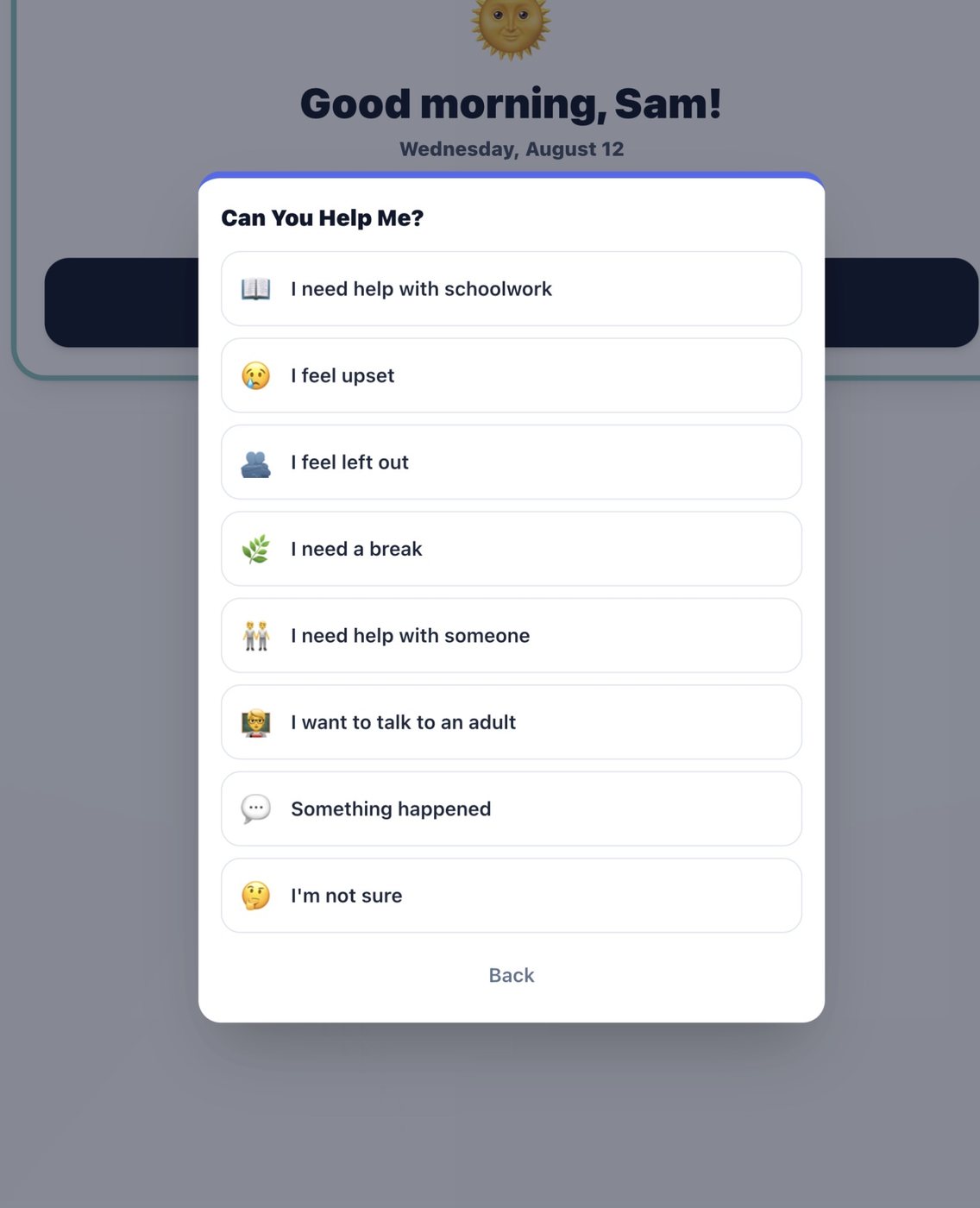
Student-Initiated Care Check™ — Structured Support Request
Student Care Check showing Can You Help Me options: I need help with schoolwork, I feel upset, I feel left out, I need a break, I need help with someone, I want to talk to an adult, Something happened
Care Check™ is student-initiated. The student chooses from structured options. The request enters the school-configured adult workflow. Escalation level is determined by the educator or counselor — never by the system. Mandated-reporter obligations always apply to authorized adults.
2 — What will I see?

Your classroom. Your students. No hunting across disconnected systems.
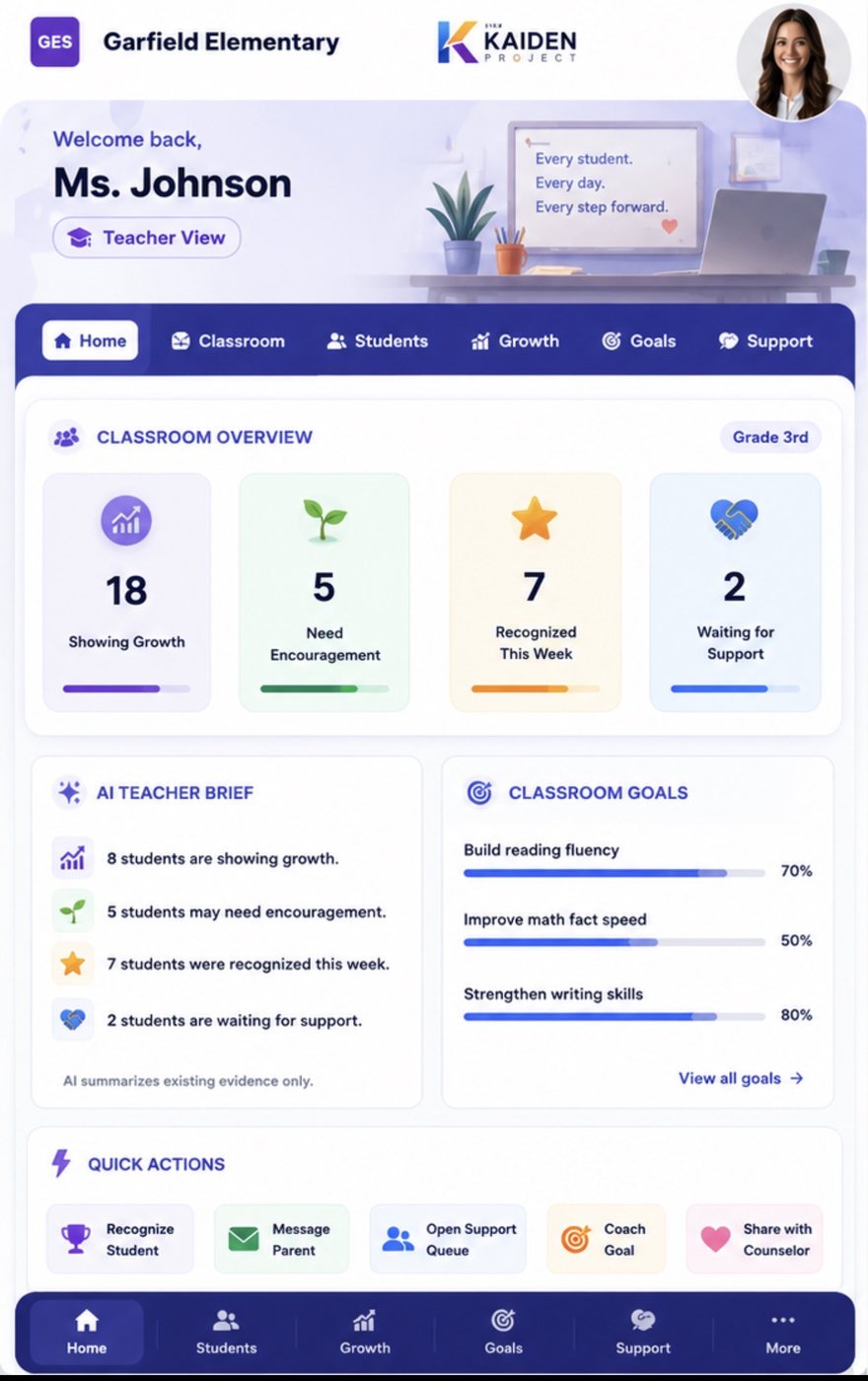
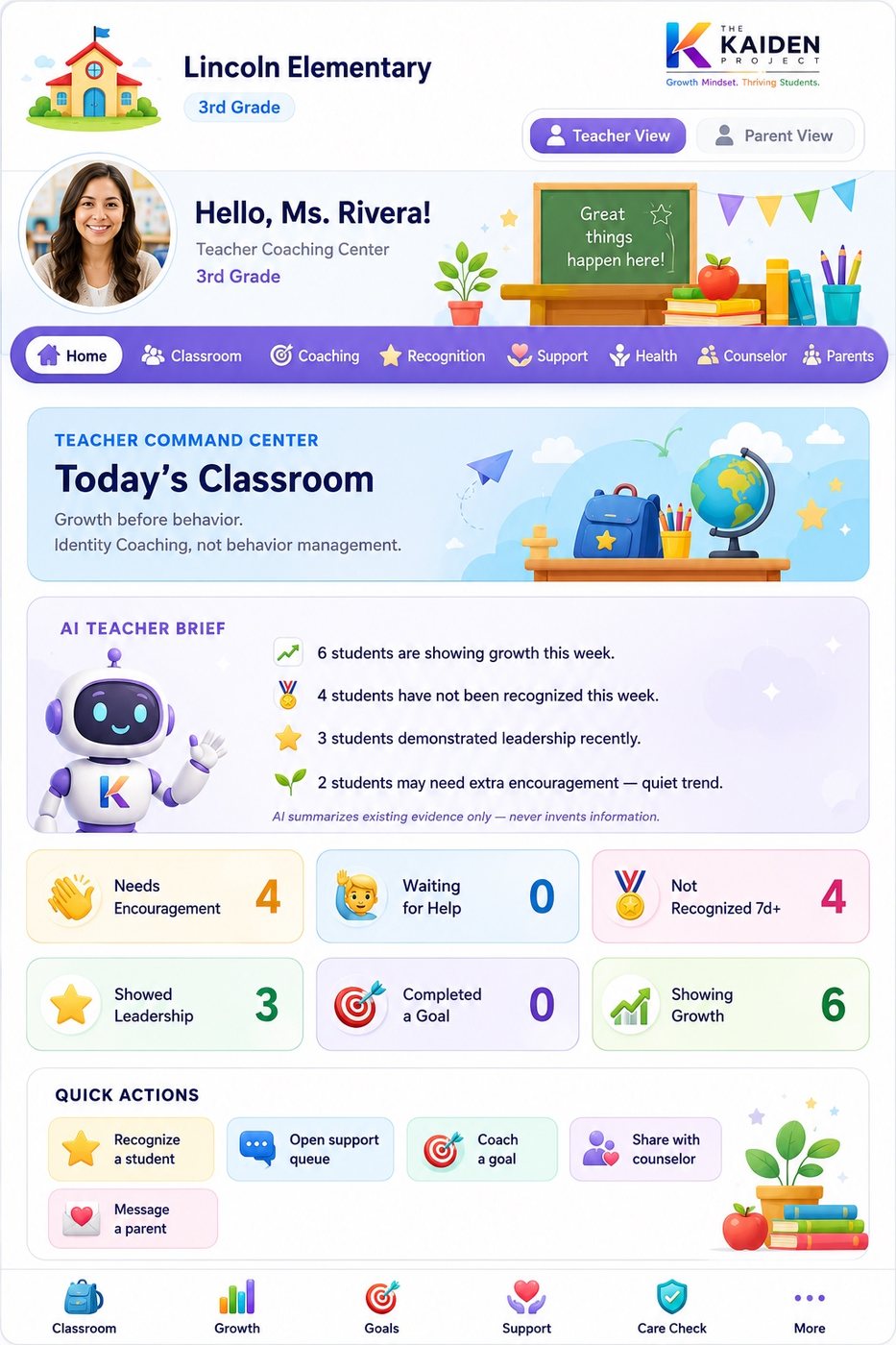
Teacher Command Center — Ms. Johnson · Garfield Elementary · Grade 3
Teacher Command Center showing Classroom Overview: 18 Showing Growth, 5 Need Encouragement, 7 Recognized This Week, 2 Waiting for Support with AI Teacher Brief
AI Teacher Brief summarizes existing evidence only — never invents information. 8 students showing growth. 5 may need encouragement. 7 recognized this week. 2 waiting for support.
Teacher Classroom Overview — Student Signals
Full classroom view showing student status categories: Showing Growth, Need Encouragement, Recognized, Waiting for Support
Support signals surface within the teacher workflow. Common actions use structured selections. The system does not replace educator judgment.
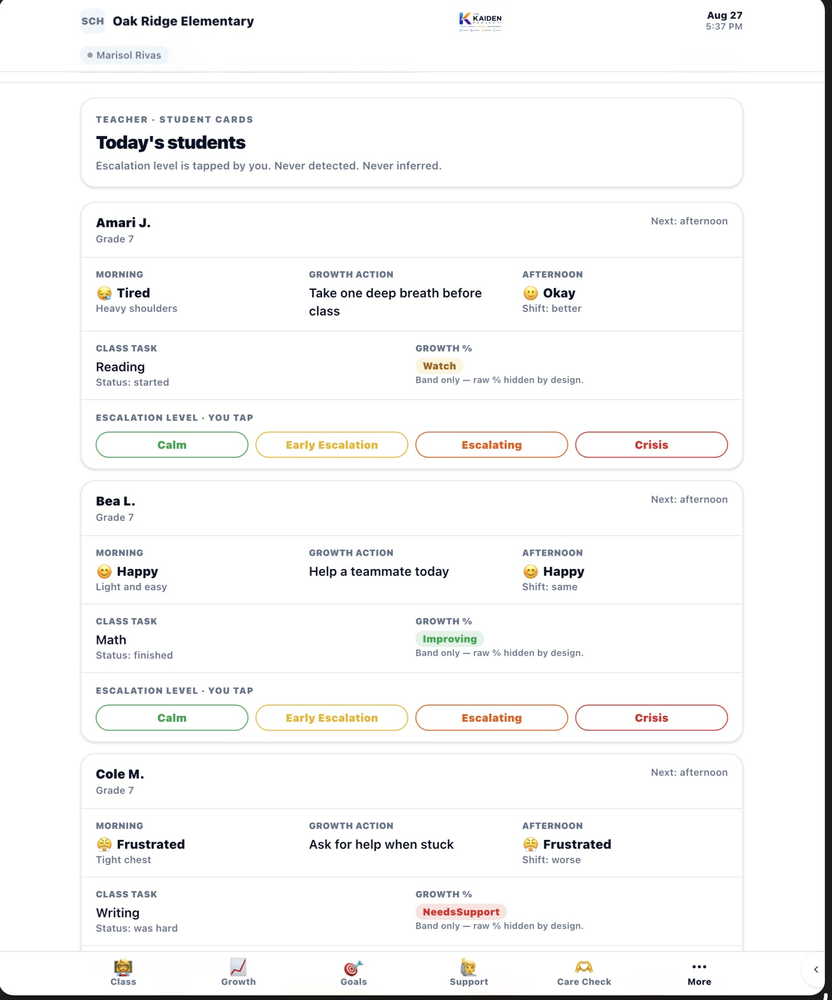
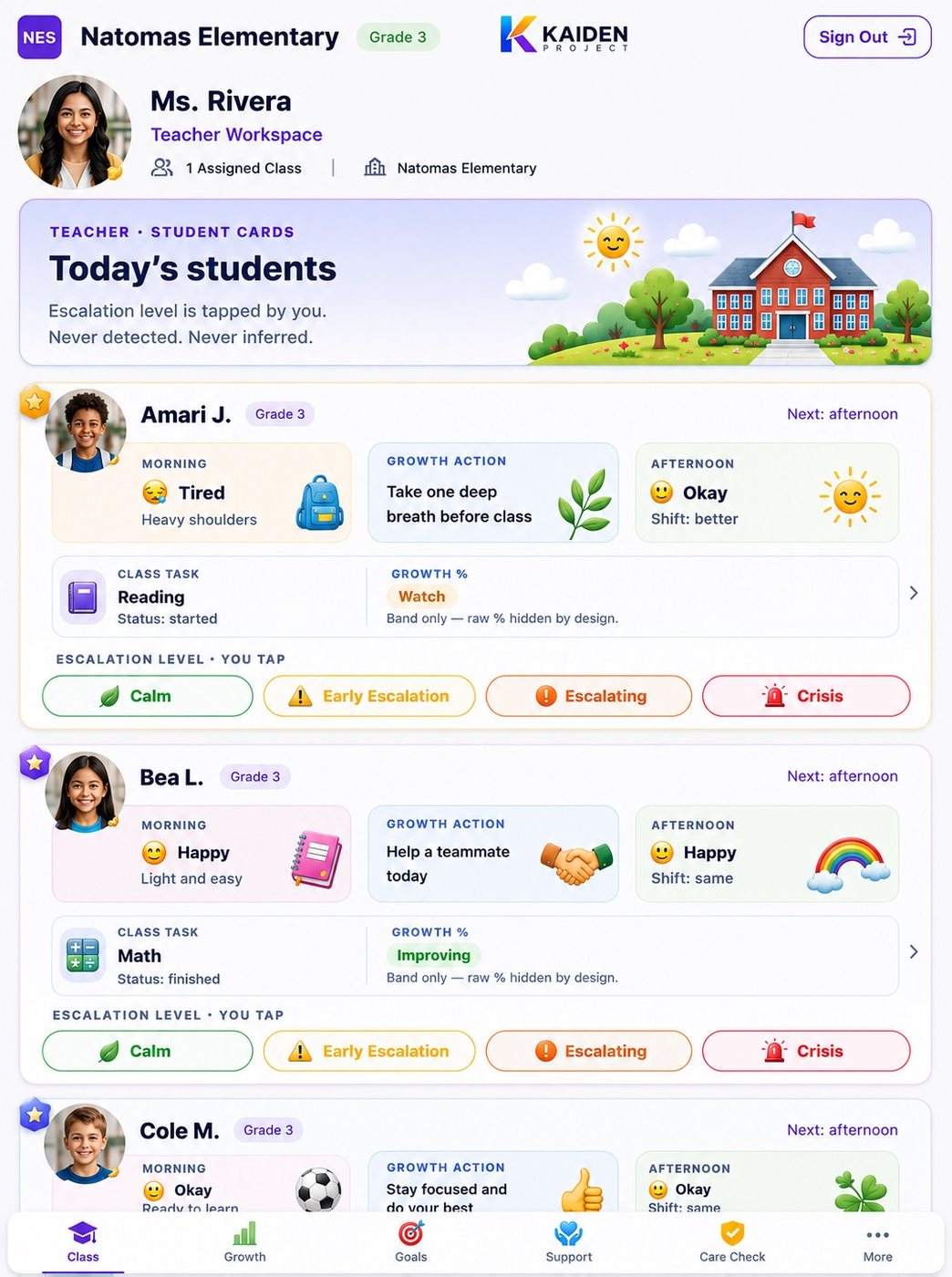
Teacher Student Cards — Today in Detail
Teacher Student Cards showing morning state calm or tired, class task status, growth action for each student, and escalation level tapped by teacher

Escalation level is tapped by you. Never detected. Never inferred. Amari J.: Morning — Tired, heavy shoulders. Class task: Reading, started. Growth action: Take one deep breath before class. Growth band: Watch. Bea L.: Morning — Happy, light and easy. Growth band: Improving. Cole M.: Morning — Frustrated, tight chest. Growth band: Needs Support.

3 — Support Before Failure™

Prevention before a hard moment. Recovery after one.

Kaiden gives teachers two distinct tools: a prevention plan to apply proactively before a difficult transition, and a recovery conversation to use after regulation has occurred. Neither replaces educator judgment — both structure it.
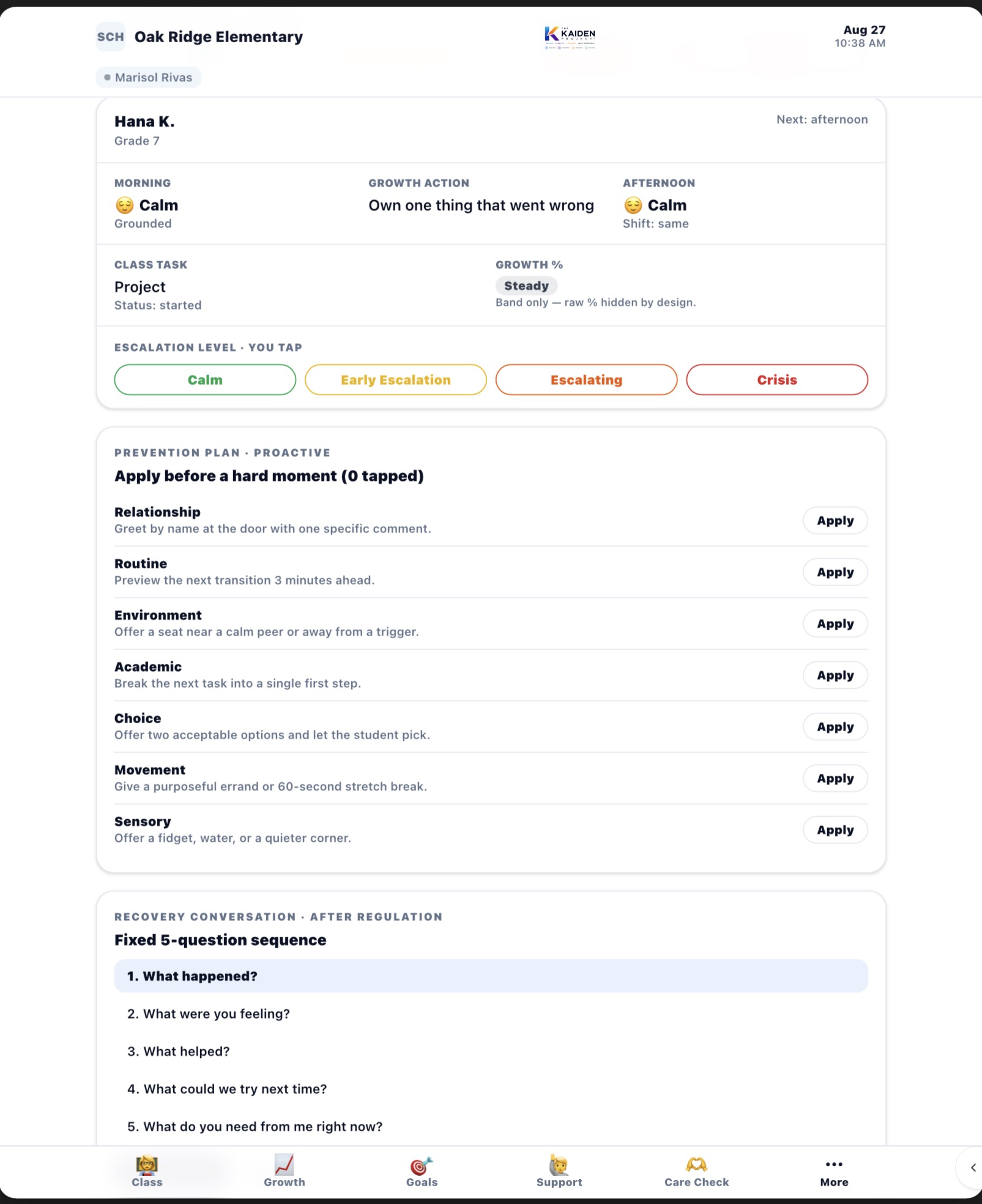
Prevention Plan and Recovery Conversation — Hana K. Grade 7
Teacher prevention plan showing proactive strategies: relationship greeting by name, environment seat near calm peer, academic break task into first step, choice two acceptable options, movement purposeful errand, sensory fidget water quiet corner. Below is the fixed 5-question recovery conversation sequence.
Prevention Plan — Apply before a hard moment (0 tapped). Six proactive strategies: Relationship, Environment, Academic, Choice, Movement, Sensory. Recovery Conversation — Fixed 5-question sequence after regulation: 1. What happened? 2. What were you feeling? 3. What helped? 4. What could we try next time? 5. What do you need from me right now?

"Human judgment stays human."

4 — Growth Health™ — Class-Level Awareness

Bands, not labels. Context, not judgments.

Class Growth% is displayed in bands first. Exact percentages are secondary detail. Children never see this screen. The band is derived from participation, goal progress, emotional readiness, engagement, and attendance — never from a single test or a teacher-assigned score.
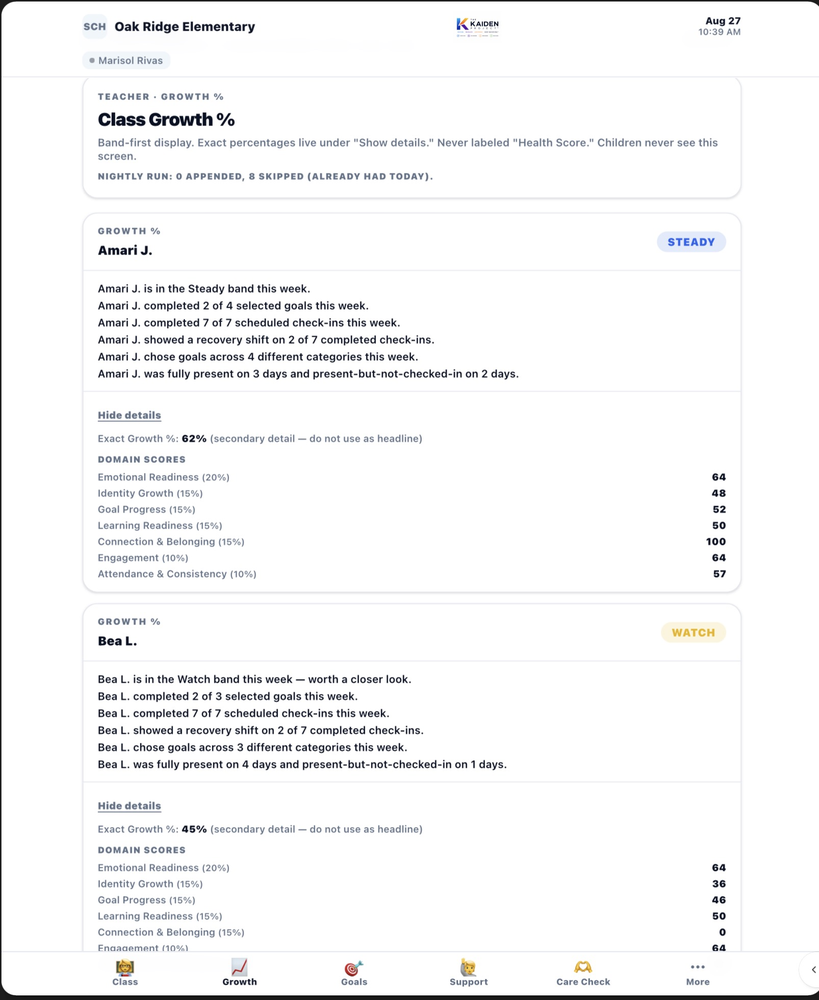
Teacher Class Growth — Band-First Display
Teacher Growth showing Amari J. in Steady band and Bea L. in Watch band with domain scores for Emotional Readiness Identity Growth Goal Progress Learning Readiness Connection Engagement Attendance

Band-first display. Exact percentages live under Show Details. Never labeled Health Score. Amari J.: Steady band. 62% — secondary detail, not used as headline. Domain scores shown for reference. Bea L.: Watch band. 45% — worth a closer look. Nightly run: 0 appended, 8 skipped (already had today). Children never see this screen.

5 — Quick Actions and Recognition

One tap to recognize. One tap to route. One tap to flag.
Teacher Quick Actions — Recognize · Message · Support · Coach
Quick Actions showing Recognize Student, Message Parent, Open Support Queue, Coach Goal, Share with Counselor
One tap to recognize a student. One tap to message a parent. One tap to open the counselor queue. Common actions use structured selections — narrative entry only when additional context is needed.
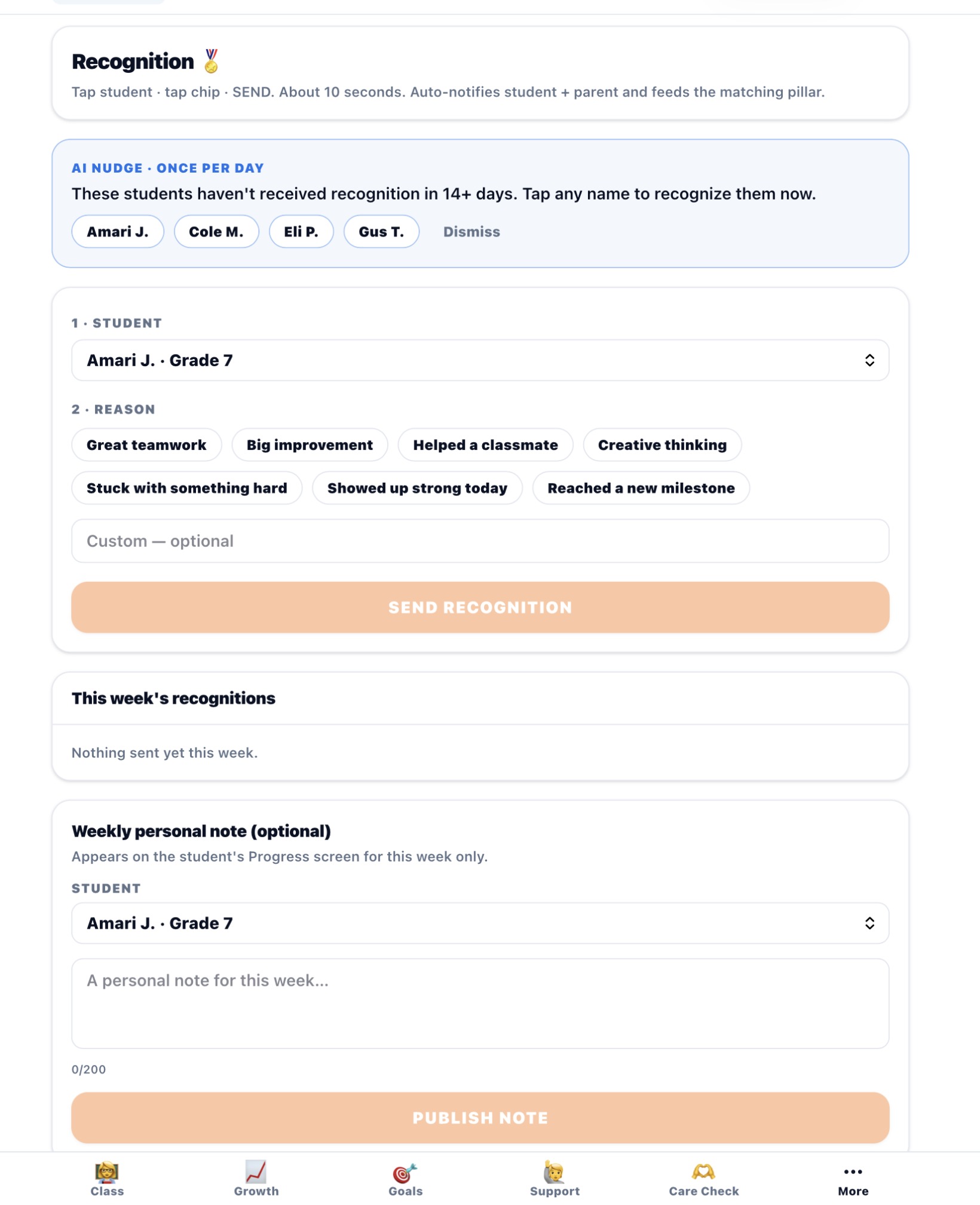
Teacher Recognition — Who Has Not Been Seen in 14+ Days
Teacher recognition interface showing AI Nudge listing students not recognized in 14 or more days: Amari J, Cole M, Eli P, Gus T. Recognition tap sends in about 10 seconds and auto-notifies student and parent.

AI Nudge. Once per day. These students have not received recognition in 14+ days. Tap any name to recognize them now. Tap student, tap chip, SEND. About 10 seconds. Auto-notifies student and parent and feeds the matching pillar. This week’s recognitions: nothing sent yet this week.

"These students haven’t received recognition in 14+ days." — the system tells you. You decide what to do.

6 — Goals and Classroom Objectives

Class-level goal progress alongside individual student signals.
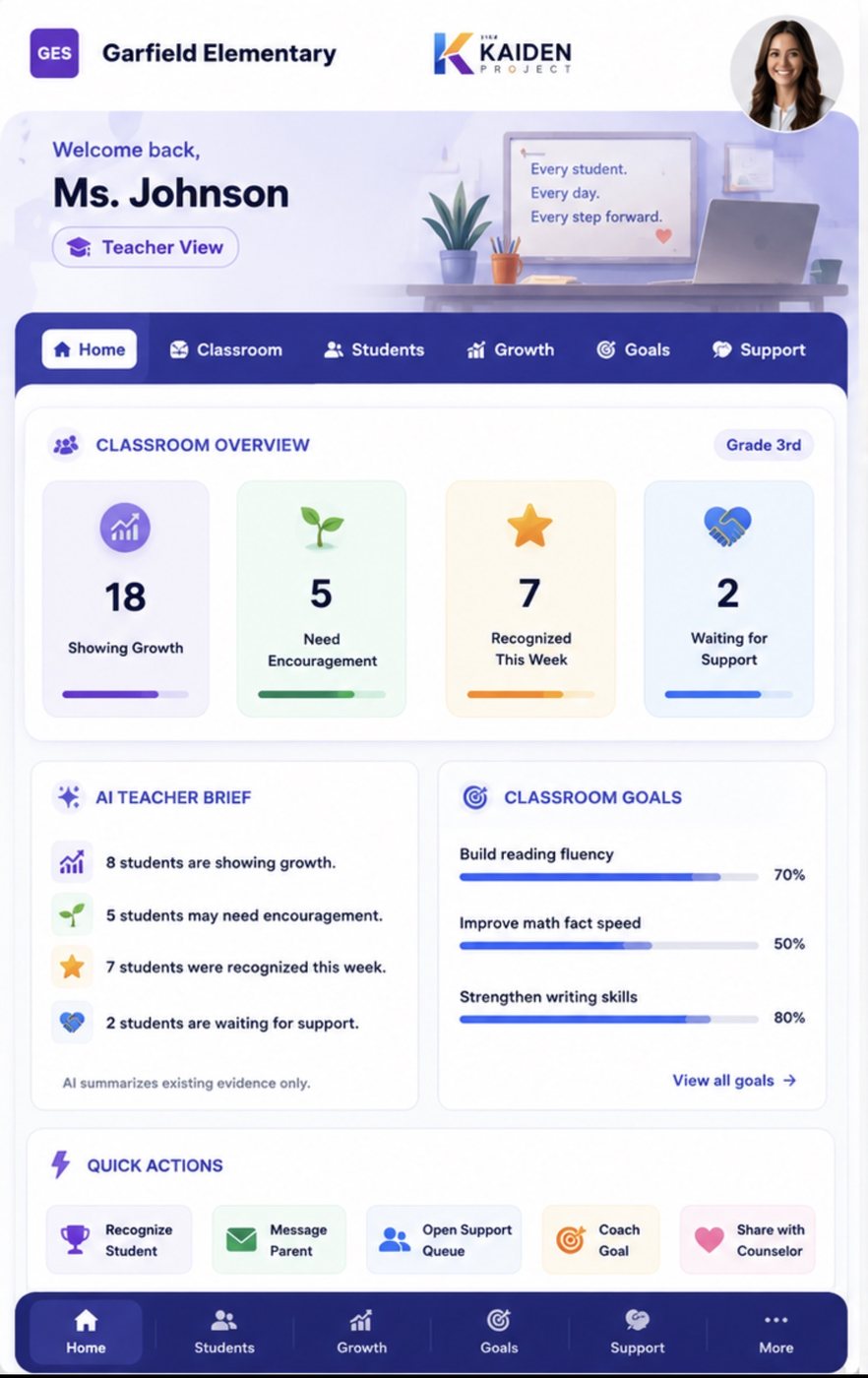
Teacher Classroom Goals — Progress by Objective
Classroom Goals showing Build reading fluency 70%, Improve math fact speed 50%, Strengthen writing skills 80%
Class-level goal progress visible alongside individual student signals. Educators see both the classroom pattern and the individual student in the same workflow.
7 — Support Routing — How Requests Reach the Right Adult

Not every request for help means the same thing.

Kaiden distinguishes between a student who needs academic help, a student who needs emotional support, and a student who needs immediate adult contact — and routes each to the appropriate configured workflow. No single request type goes everywhere. No adult is burdened with every signal.

Teacher Workflow

Academic support requests, goal coaching, classroom recognition, and in-classroom behavioral context stay inside the teacher workflow and do not automatically surface to the counselor.

Counselor Workflow

Student-initiated Care Check™ requests that are configured to reach the counselor enter the counselor queue directly. The teacher sees that follow-up is in progress without seeing confidential counselor notes.

Escalation level is determined by the educator or counselor — never by the system. The system surfaces the signal. The human determines what it means and what happens next.

COUNSELOR WORKSPACE — CASELOAD

Every support need has an owner, a next step and a record.

The Counselor workspace brings student support requests, unresolved patterns, scheduled follow-ups, meetings, and caseload activity into one governed workflow. Counselors see what requires attention, determine the appropriate action, and document follow-through on the student’s authorized timeline.
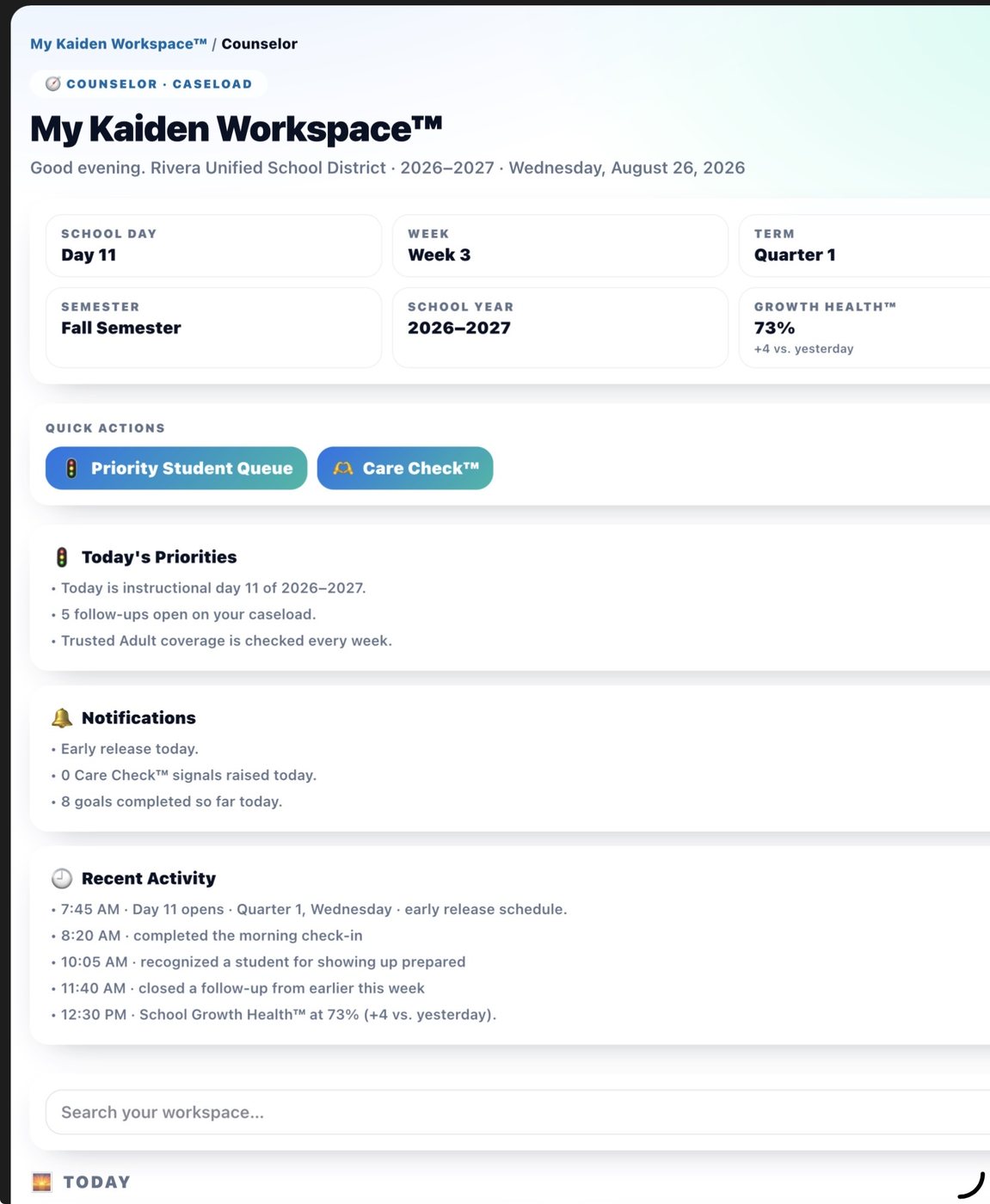
Counselor My Kaiden Workspace — Start the Day With Caseload Priorities in View
Counselor workspace showing caseload scope, Growth Health 73%, Priority Student Queue, Care Check buttons, 5 follow-ups open, notifications and recent activity

My Kaiden Workspace™ gives the counselor a role-scoped caseload view. Open follow-ups rise into today’s priorities. Priority Student Queue and Care Check™ remain distinct workflows. 5 follow-ups open on caseload. 0 Care Check™ signals raised today. 8 goals completed so far. Trusted Adult coverage is checked every week.

Follow-Up Center — Nothing Is Forgotten Counselor Follow-Up Center at Lincoln Elementary showing Support Requests Waiting On You, Create Follow-Up with student ID action type and reason fields, and Active Follow-Ups section

The Follow-Up Center combines open support requests with counselor-owned next steps. A counselor identifies the student, selects the appropriate action — Meet student, Check in, Follow up, or custom — adds reason or context, and creates a follow-up that remains visible until completed. Every action logs to the student’s authorized chronological timeline. Nothing is forgotten. Every message is clearly labeled by who it’s from.

Human Authority Is Protected

Care Check™ is a distinct student-initiated support pathway. Support requests and counselor follow-ups are additive and do not alter Growth Health™ scores. Private counselor notes and confidential student information remain at school — never visible to families through the platform.

Patterns inform — people decide.

See Kaiden in Your School

Begin with a conversation about your students, your existing workflows, and how Kaiden could fit.

← Home ← Home Schedule Discovery →